
Safety
- Children and persons requiring assistance should not bathe without supervision
- People with heart problems, high blood pressure or diabetes, as well as other serious illnesses , should only use the tub after consulting a doctor.
- People with heart disease or high blood pressure are advised not to use the whirlpool.
- Alcohol consumption or particularly high physical strain can be a danger when using the whirlpool.
- Be careful not to slip when getting in and out of the whirlpool.
- Please note that the floor of the tub can be more slippery due to soap residues and other products.
- To avoid damage to the product, wash the whirlpool with a soft cloth and neutral soap; do not use acid or alkaline cleaners.
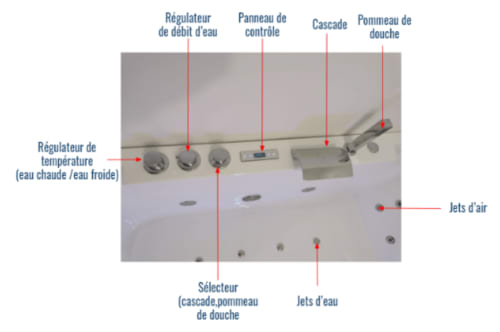
- Avoid getting water directly into the hole of the shower head holder (to avoid it flowing under the bathtub)
Popup with images
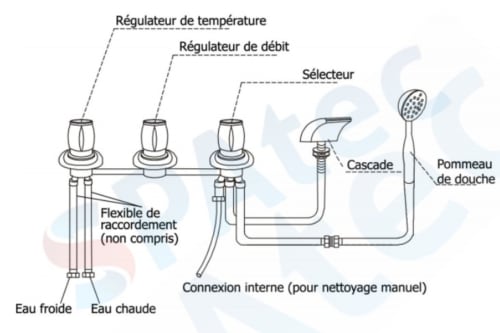
Illustrative photos of the Balneo/Jacuzzi bathtub

Start/Stop
💎 BEFORE STARTING
- ⚠️It is strongly recommended to rinse off in the shower cabin before using the Balneo
- ⚠️For ecological reasons and in order not to empty the hot water tank that supplies the whole flat, we advise you to run ⅓ of cold water and ⅔ of hot water to reach the ideal temperature for a bath around 25°.
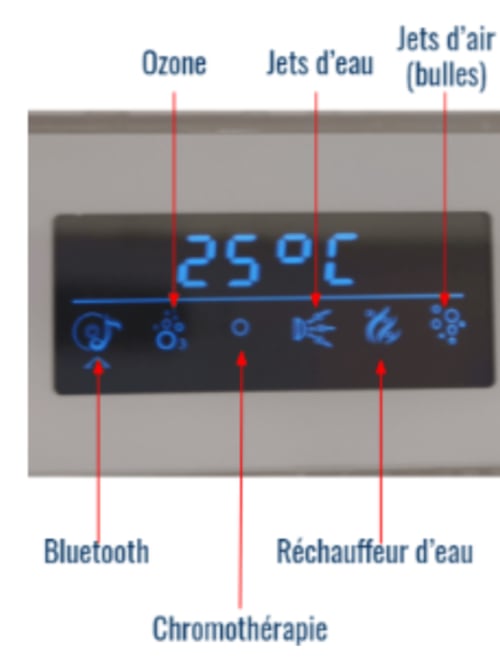
- Press the Start/Stop for 2 seconds to turn on the panel, the panel will light up.
- Press the Start/Stop again to turn it off.
- The control panel will automatically lock after a short time without activity, and the word LOCK will appear on the display. To unlock the control panel, press and hold 🆗 for 3 seconds .
- To manually lock the control panel, press and hold 🆗 for 3 seconds
Massage features
💎 AIR JETS
- Use ◀️or ▶️ to select the Air Jets option (6th option on the control panel from the left) and confirm by pressing 🆗 . The bubbles will appear.
- Press 🆗 again to stop
💎 WATER JETS
- Use ◀️ or ▶️ to select the Water Jets option (4th option on the control panel from the left) confirm by pressing🆗 .The 26 jets will turn on.
- Press 🆗 again to stop.
- ⚠️The 26 jets only work if the water level is correct: all jets must be covered with water.
- ⚠️If the water level is low, the jets will stop, and the icon will flash until the water level restores itself, the jets will then start.
Bluetooth Connection
💎DEVICE APPARATUS
- With the system turned on, select the Bluetooth option (the 1st option on the control panel from the left) and press 🆗 for 2s so that the display shows "PAIR".
- Activate the Bluetooth of your device.
- The Bluetooth name is "JOYONWAY ". Select this name on your device, to continue you will need to enter the 4 digit PIN code displayed on the user sheet provided next to the Balneo bath.
- Select the music on your mobile device and press🆗 until the display shows "BT--C " .
- To turn it off, press Start/Stop again until "BT--C " disappears.
- To change the song, press Start/Stop , when "P--N " appears on the display, press ◀️or ▶️ to make your selection.
- Press 🆗 for 2 seconds to pause the song and press 🆗 again to activate.
- To enter the volume control mode, press Start/Stop until "VOL " appears. Press◀️or ▶️ to increase the volume and to decrease the volume. The volume setting ranges from 0 to 20.
- When the Bluetooth music playback function is activated, the ozonator will automatically turn off.
Temperature control
💎MAINTAINING THE TEMPERATURE
- This water heating function with thermostatic control is designed to maintain the temperature of the bath water.
- ⚠️This is not a means of heating cold water . The water massage jets must be on for this feature to work.
- Use ◀️ or ▶️ to select Heater option (5th option on the control panel from the left) ,confirm the temperature using 🆗.
- The bath water temperature will then be maintained from 1º of the set temperature.
- Press 🆗 again to stop the function.
- The temperature display shows the current water temperature. With the temperature control selected, press the temperature display will start to flash,
- Use ◀️ or ▶️ to change the temperature down or up or up 1° with each click.
- When the desired temperature is displayed, remove your finger from the display. After 5 seconds, the display will show the current temperature again and slowly increase or decrease to the desired temperature.
- ⚠️The default bath temperature is 37°C Temperature range: 35°C - 45°C
- ⚠️The system will only add heat if needed, it cannot cool the water, please add cold water for this.
Chromotherapy and Ozone
💎CHROMOTHERAPY
Use ◀️or ▶️ to select the chromotherapy option (3rd option on the control panel from the left) ,
Confirm the selection with🆗 and the underwater spotlight will turn on and change colour automatically.
Press 🆗 again to turn off the colour therapy.
⚠️For information, chromotherapy is a method of harmonising and helping to heal certain disorders, physical or emotional, through the use of colours
💎OZONE
💎OZONE
- Use ◀️or ▶️to select the Ozone option (2nd option on the control panel from the left) ,
- Confirm 🆗and the ozonator will start to operate.
- Press 🆗sur again to stop it.
- ⚠️Ozone eliminates 99% of bacteria and ensures optimum cleanliness for the circuits, pipes, as well as in the bath shell.
- ⚠️The ozonator will automatically switch off after 10 minutes if not reactivated.